
WeChat Pay
Accept payments with WeChat Pay.
- Checkout Native QR code on your own
/app/billing/pay/<order>page, CNY one-time payments only - Subscriptions No
- Portal No
- Refunds Yes
Before you begin
A public HTTPS site, an active plan on /admin/plans, and access to the merchant dashboard.
Expected result — an order reconciled with a signed payment notification.
Set up WeChat Pay
Enable Native payments
Open WeChat Pay. Enable Native支付 in the merchant account’s 产品中心.
Link the AppID
Under AppID账号管理 link your application and record its AppID and merchant ID.
Request the merchant certificate
Request a merchant API certificate under API安全. Keep the private key and record the certificate serial number.
Set the decryption key
Set the APIv3 key for decrypting notifications.
Download the verification key
Download the WeChat Pay public key and copy its public key ID. Each order supplies its own notification URL.
Provider documentation · Native payments · verifying with the WeChat Pay public key
Configure the application
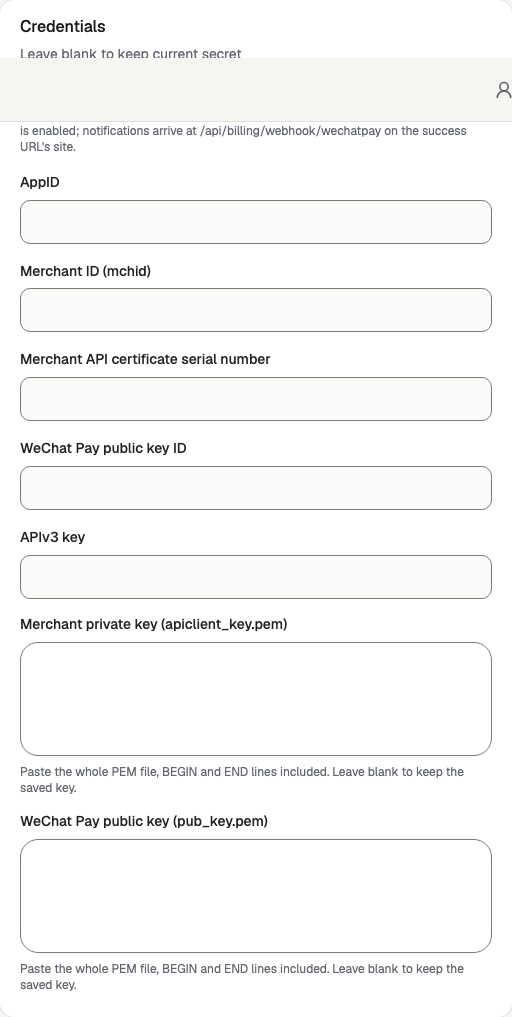
Open /admin/config/payment in the Kernlift admin console. Select WeChat Pay. Enter your public Success URL and Cancel URL, then set API base URL to https://api.mch.weixin.qq.com.
| Value from provider | Admin field |
|---|---|
| Merchant platform → 产品中心 → AppID账号管理, and the account page. | AppID, Merchant ID (mchid) |
账户中心 → API安全 → 商户API证书; paste the whole apiclient_key.pem. | Merchant API certificate serial number, Merchant private key |
| 账户中心 → API安全 → APIv3密钥, the 32-character key you set. | APIv3 key |
账户中心 → API安全 → 微信支付公钥: the PUB_KEY_ID_… and the whole pub_key.pem. | WeChat Pay public key ID, WeChat Pay public key |
Enable the provider and click Save provider.
Preserve the PEM format
Verify
- Open a low-value, one-time CNY plan and scan its QR code to pay.
- Check the signed notification and paid order in admin.
- Refund the test order before activating delivery and check the provider refund status.
Troubleshooting
WeChat Pay checkout is refused with provider_unsupported
WeChat Pay charges CNY one-time payments only. On /admin/plans, price the plan in CNY with the one-time or lifetime interval, or use another provider for that plan.