
Waffo
Accept payments through Waffo, a merchant of record that collects and remits sales tax.
- Checkout Waffo hosted checkout, priced from your plan with tax included
- Subscriptions Monthly and yearly, settled on the first payment
- Portal No
- Refunds In the Waffo dashboard only
- Promotion codes Yes
Waffo is the merchant of record: it sells to the buyer and handles sales tax. Checkout needs products that already exist in Waffo, but you create only three, shared by every plan. The price of each session comes from the plan.
Before you begin
A public HTTPS site, an active plan on /admin/plans (see Manage pricing plans), and a Waffo merchant account with a store. Work in the Test environment until the whole flow works.
Expected result — a test purchase settled by a signed order.completed or subscription.activated webhook.
Set up Waffo
Create the API key
In the Waffo dashboard open API & Development → API Keys and click Create API Key with the Test environment. Download the private key at once; it is not shown again. The key's environment decides test or live mode. Record your merchant ID (MER_…) as well.
Create the products
Create one one-time product, one monthly subscription product and one yearly subscription product, and copy their IDs. Each checkout overrides the price, so the product prices do not matter.
Register the webhook
Under Settings → Webhooks, add an HTTP webhook in test mode with the URL https://<your-domain>/api/billing/webhook/waffo. Subscribe to order.completed and subscription.activated.
Copy the webhook public key
On the same page copy the Webhook Public Key for the Test environment. Test and production use different keys.
Provider documentation · Authentication · Create a checkout session · Webhooks
Configure the application
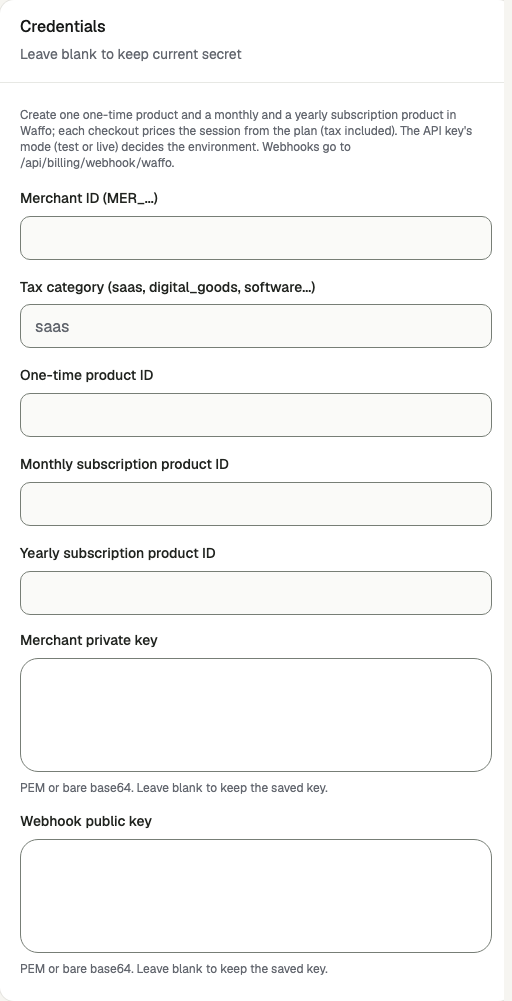
Open /admin/config/payment in the Kernlift admin console. Select Waffo. Enter your public Success URL and Cancel URL, and leave API base URL at https://api.waffo.ai.
| Value from provider | Admin field |
|---|---|
Merchant ID (MER_…) | Merchant ID (MER_...) |
The tax category of what you sell: saas, digital_goods, software, ebook, online_course, consulting or professional_service | Tax category (saas, digital_goods, software...); blank keeps saas |
| The three product IDs | One-time product ID, Monthly subscription product ID, Yearly subscription product ID |
| The downloaded API private key | Merchant private key |
| The Webhook Public Key of the same environment | Webhook public key |
Enable the provider and click Save provider. The card shows Ready once the merchant ID, private key and at least one product ID are saved, and Webhook ready once the webhook public key is saved. To let buyers enter a code, turn on Allow promotion codes at checkout; create the codes in Waffo.
A plan needs its product
Verify
- Sign in as an ordinary user, open
/pricingand buy a plan. Expected: you are sent to the Waffo checkout, showing the plan's price. - Pay with Waffo's test payment details. Expected: you return through
/api/billing/callback/waffo, which looks up the order's payments in Waffo before marking it paid. - Open
/admin/billing-webhooks. Expected: anorder.completed(one-time) orsubscription.activated(subscription) event with a valid signature. - Open
/admin/orders. Expected: the order is paid, and its invoice shows the amount charged, lower than the plan price if a promotion code was used.
Go live
- Create a production API key and production products, and add the webhook again with test mode off.
- Save the production merchant private key, product IDs and the production webhook public key. A test key cannot verify production events.
- Make one real purchase and refund it in the Waffo dashboard.
Troubleshooting
Webhooks fail the signature check
The saved webhook public key belongs to the other environment, or is missing. Waffo signs t in milliseconds and retries reuse it, so events up to 45 minutes old are accepted; older ones are refused. A proxy that rewrites the request body also breaks the signature.
Checkout fails with "No Waffo subscription product is configured"
The plan is a subscription whose interval has no product ID. Save the monthly or yearly product ID, or change the plan's interval.
A refund or renewal does not appear on the order
Refunds and subscription changes are made in the Waffo dashboard. Their events, such as refund.succeeded and subscription.renewed, are stored as ignored: they do not change the local order, create a new order or grant the plan's credits again.