
DodoPayments
Accept payments with DodoPayments.
- Checkout Hosted checkout, needs a DodoPayments product
- Subscriptions No lifecycle actions
- Portal No
- Refunds No
Before you begin
A public HTTPS site, an active plan on /admin/plans, and access to the merchant dashboard.
Expected result — an order reconciled with a signed payment notification.
Set up DodoPayments
Create the test product
Open DodoPayments. Select Test Mode and create a product under Products. Copy its product ID.
Issue the API key
Generate an API key under Developer → API Keys.
Register payment events
Add your HTTPS endpoint ending in /api/billing/webhook/dodopayments under Webhooks. Select payment.succeeded and payment.failed, then copy the entire signing secret.
Provider documentation · Dodo products · official integration example
Configure the application
Open /admin/config/payment in the Kernlift admin console. Select DodoPayments. Enter your public Success URL and Cancel URL, then set API base URL to https://test.dodopayments.com.
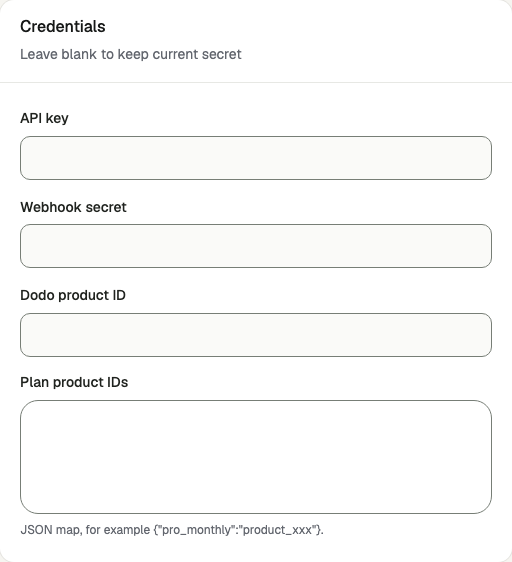
| Value from provider | Admin field |
|---|---|
| API key | API key |
| Product ID | Dodo product ID |
| Signing secret | Webhook secret |
| Optional plan-to-product JSON mapping | Plan product IDs |
Enable the provider and click Save provider.
Verify
- Buy a plan on
/pricingas a sandbox buyer. - Check the signed event on
/admin/billing-webhooks. - Find the same order on
/admin/ordersand confirm it is paid.
Go live
Create live credentials and register the production webhook in the live account. Save its verification value with the matching credentials and https://live.dodopayments.com.
Troubleshooting
Webhooks fail the signature check
Paste the full signing secret including its prefix. Check that the server clock is accurate and the request body reaches the app intact.