
Alipay
Accept CNY payments on Alipay's computer-website cashier.
- Checkout Alipay's computer-website cashier (
alipay.trade.page.pay), CNY one-time payments only - Subscriptions No
- Portal No
- Refunds Yes
- Promotion codes No
Plans priced in CNY go to WeChat Pay when it is enabled and complete, and to Alipay otherwise. A plan in another currency, or a subscription plan, is refused before Alipay is called.
Before you begin
A public HTTPS site, an active one-time plan priced in CNY on /admin/plans (see Manage pricing plans), and an Alipay Open Platform account. Start with the sandbox app, which the gateway field points at by default.
Expected result — an order settled by a verified asynchronous notification, and refunded from the console.
Set up Alipay
Open the sandbox app
Open the Alipay Open Platform and use the sandbox application. For production, create a web application and sign the 电脑网站支付 (computer website payment) product for it.
Generate the app key pair
Generate an RSA2 (2048-bit) key pair with Alipay's key tool. Keep the app private key; PKCS#1 and PKCS#8 both work.
Choose public key mode
Under 接口加签方式 choose public key mode (公钥模式, not certificate mode), upload the app public key and copy the Alipay public key it shows.
Record the identifiers
Record the APPID. Optionally record your account's PID, the user id starting with 2088, so notifications from another seller are rejected.
No notification URL is registered with Alipay. Each cashier address carries notify_url: the origin of your Success URL followed by /api/billing/webhook/alipay.
Provider documentation · Computer website payment · Asynchronous notifications · Signing and verification
Configure the application
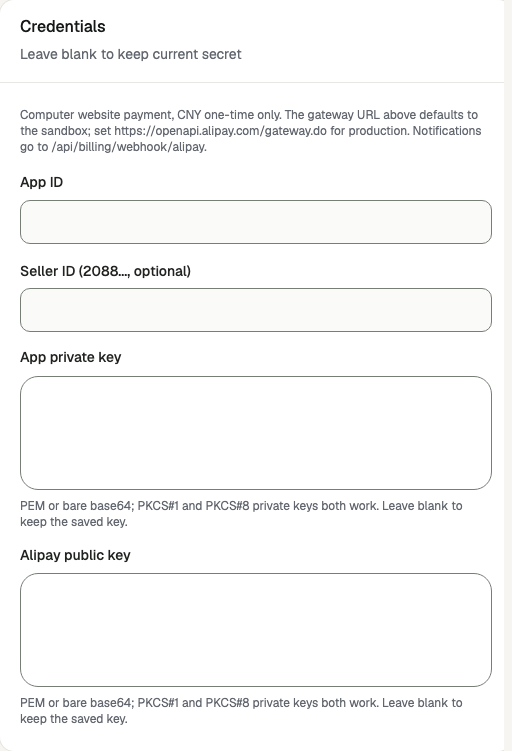
Open /admin/config/payment in the Kernlift admin console. Select Alipay. Enter your public Success URL and Cancel URL. Leave API base URL at the sandbox gateway, https://openapi-sandbox.dl.alipaydev.com/gateway.do, while testing.
| Value from provider | Admin field |
|---|---|
| The application's APPID | App ID |
Account PID (2088…), optional | Seller ID (2088..., optional) |
| The private key of the pair you generated | App private key |
| The Alipay public key shown after uploading your app public key | Alipay public key |
Enable the provider and click Save provider. The card shows Ready once the App ID and both keys are saved, and Webhook ready once the Alipay public key is saved.
Two different public keys
Verify
- Sign in as an ordinary user, open
/pricingand buy the CNY one-time plan. Expected: you are sent to the Alipay cashier. - Pay with the sandbox buyer account. Expected: you return through
/api/billing/callback/alipay, which queries the trade withalipay.trade.querybefore the order is marked paid. - Open
/admin/billing-webhooks. Expected: aTRADE_SUCCESSevent from Alipay with a valid signature. - On
/admin/orders, refund the order. Expected: the refund succeeds at once.
Go live
- Set API base URL to
https://openapi.alipay.com/gateway.do. - Save the production APPID, its app private key and the production Alipay public key. Sandbox keys do not verify production notifications.
- Make one real purchase and refund it.
Troubleshooting
Alipay checkout is refused with provider_unsupported
Alipay charges CNY one-time payments only. On /admin/plans, price the plan in CNY with the one-time or lifetime interval, or use another provider for that plan.
CNY plans go to WeChat Pay instead of Alipay
WeChat Pay takes CNY plans first whenever it is enabled and complete. Untick it on /admin/config/payment if Alipay should take them.
The notification is stored with a .mismatch type
The signature verified, but the app_id, seller_id or total_amount does not match. Check the App ID and Seller ID you saved, and that the plan price was not changed after the order was created.